How to Renew
- I've set up an account — how do I renew?
If you've accessed this system since our transition in December 2025, simply sign into your account and begin the renewal process. Follow the detailed steps below.
- Step 1: Find your open invoice
In the GVMA Portal, navigate to Membership > Renew Membership.
Pro Tip: Memberships are dropped 1 month after expiration. If your membership has been dropped, you will see the option to Join as a Member. If the process states that you are ineligible to renew or join, please submit a support ticket.
- Step 2: Select your membership type
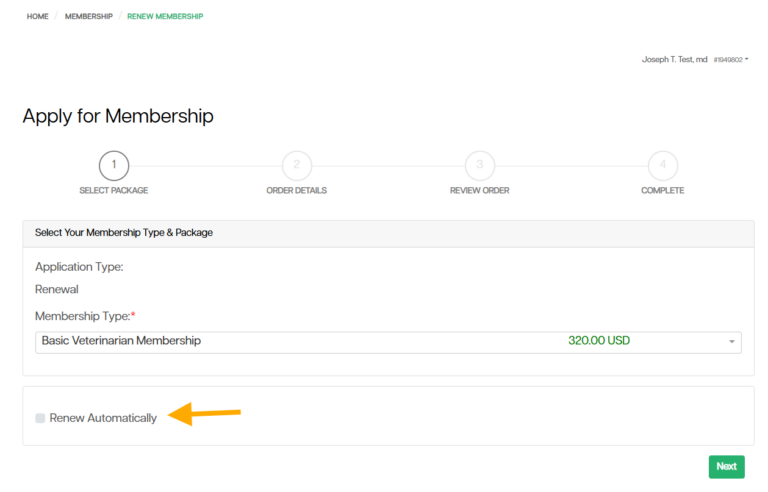
After updating your information, you will see the option to select any membership types that you may qualify for.
Pro Tip: Members now have the option to sign up for automatic renewal. Save time and energy by selecting the Renew Automatically option to charge your saved payment method automatically the day your membership is set to expire. Don't fret — we'll send you email reminders before your renewal processes.
- Step 3: Proceed to payment
Click Next to proceed to the payment page.
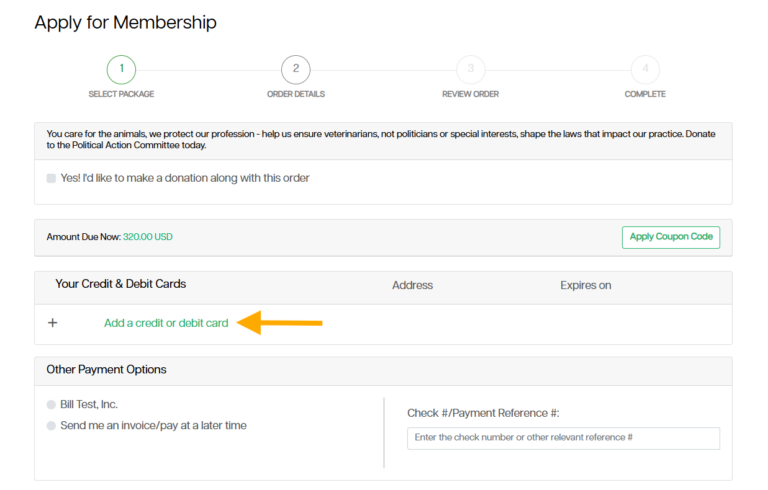
Pro Tip: If you would like to make a partial payment, select the Send me an invoice/pay at a later time option under the Other Payment Options section. This will generate an online invoice where you can apply separate payments or send it for payment approval.
- Step 4: Add your payment method
To proceed with payment, select Add a credit or debit card.
- Step 5: Save your card (optional)
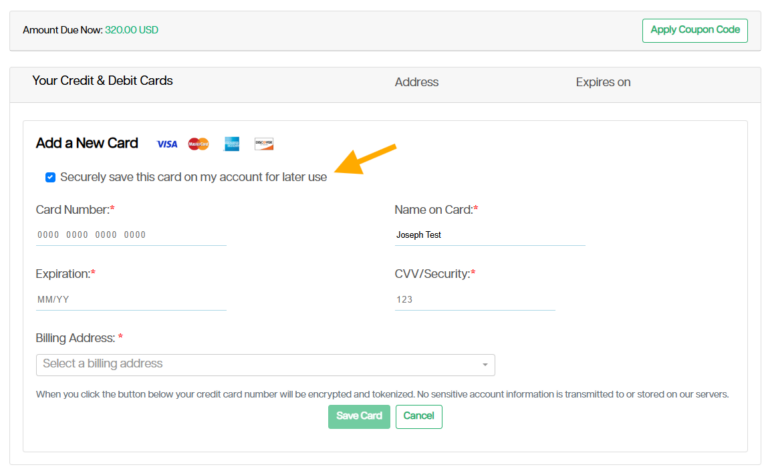
In our new system, you have the opportunity to securely save your card for later use. If you do not want to save your payment method, simply uncheck the box next to Securely save this card on my account for later use before entering your card information.
Pro Tip: This can be an easy way to register for future events quickly. You can also associate this card with your membership, should you opt in to automatic membership renewal.
- Step 6: Enter payment and billing address
Enter your payment information and billing address associated with the card.
Pro Tip: By default, the system will automatically pull up the addresses associated with your account for you to choose from. If the billing address differs, select Use another address from the dropdown options. This uses the Google Maps database to pull up potential addresses as you type. Select from the list, or select the dropdown arrow to the right of the address box to manually enter or edit the address.
- Step 7: Save your card
Select Save Card.
- Step 8: Make your payment
Select Make Payment. Now, pat yourself on the back — your renewal is complete!
Reminder: If you are renewing as a Government or Qualified member, your renewal application will require verification. This typically takes less than 24 hours. After this, you will be notified via email of your membership application status.
Was this article helpful?
That’s Great!
Thank you for your feedback
Sorry! We couldn't be helpful
Thank you for your feedback
Feedback sent
We appreciate your effort and will try to fix the article